Showing posts with label Linux Kernel. Show all posts

Monday, December 4, 2017

container_of macro


kernel container_of macro


#define container_of(ptr, type, member) ({ \
    const typeof( ((type *)0)->member ) \
    *__mptr = (ptr);
    (type *)( (char *)__mptr - offsetof(type,member) );})
 
 
When you use the cointainer_of macro, you want to retrieve the structure that contains the pointer of a given field. For example:

struct numbers {  
   int one; 
   int two; 
   int three; 
} n;  

int *ptr = &n.two; 
struct numbers *n_ptr; 
n_ptr = container_of(ptr, struct numbers, two);


You have a pointer that points in the middle of a structure (and you know that is a pointer totwo
 [the field name in the structure]), but you want to retrieve the entire structure (numbers). So, you calculate the offset of the filed two in the structure:
offsetof(type,member)

and subtract this offset from the given pointer. The result is the pointer to the start of the structure. Finally, you cast this pointer to the structure type to have a valid variable.
 

Saturday, June 8, 2013

V4L2 Tutorial


V4L2 - video for linux 2 is a set of APIs and standards for handling video devices on Linux. Video devices could be camera sensors providing streams, video encoder , video decoder and apart from these there could be analog radio and any output drivers as device. So mainly all the v4l2 devices would be char type device and each devices get represented by its names in the /dev tree like /dev/video. If there is multiple device or video related data, streams then there can be multiple video device names like /dev/video0 , /dev/video1 , basically /dev/videoX. 

Since it provides set of APIs to handle these devices which lies in physical memory region of the system and get juice from kernel. So v4l2 gets integrated with media framework and resides in kernel as v4l2 driver ,helps to integrate the device/sub-device kernel driver with the media framework. 
V4L2 API includes a very long list of driver callbacks to respond to the many ioctl() commands made available to user space.


Kernel Side V4L2 Operations : -
a)Opening V4L2 device using v4l2_open()
b) Controlling V4L2 device using v4l2_ioctl()
c) Reading from V4L2 device using v4l2_read()
d) Writing onto V4L2 device using v4l2_write()
e) Polling onto V4L2 device using v4l2_poll()
f) Mmaping v4L2 device using v4l2_mmap()
g) Closing V4L2 device using v4l2_release()

for ex:
fd = open("/dev/video0", O_RDWR);
close(fd)

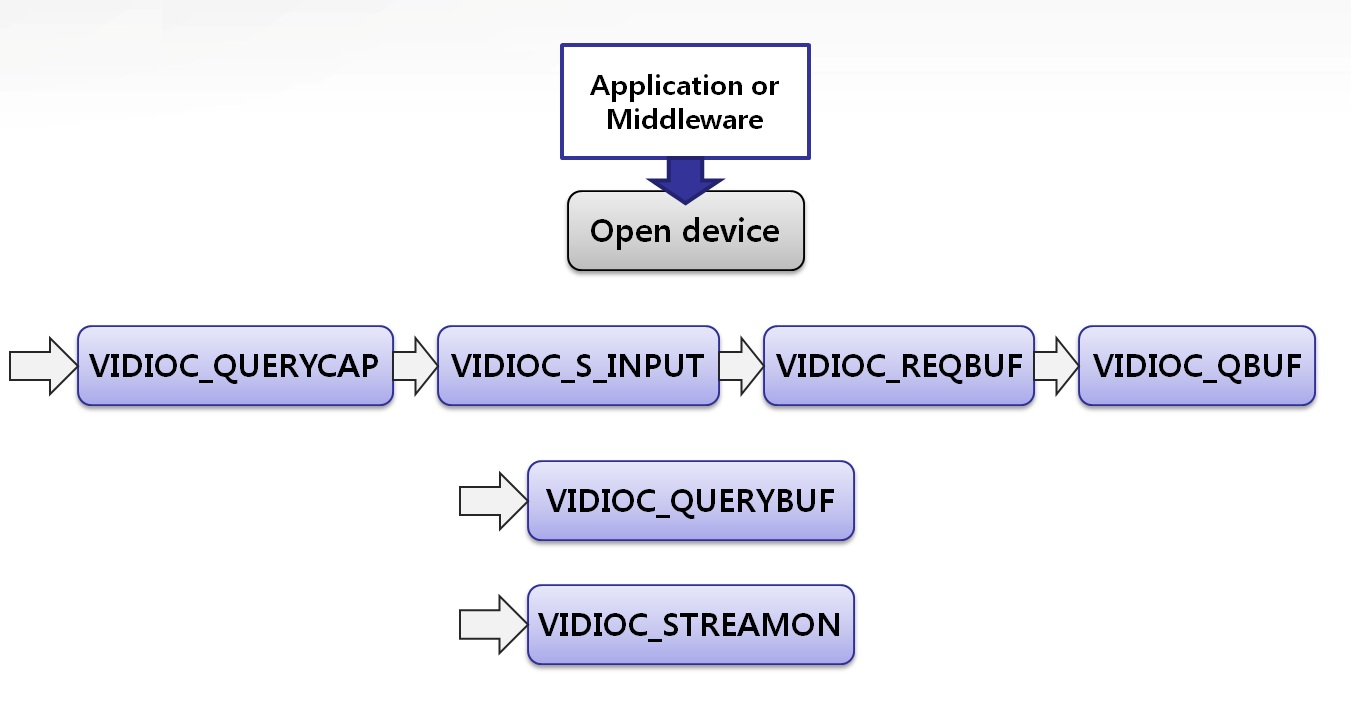
V4L2 ioctl : 
a)VIDIOC_S_FORMAT
b)VIDIOC_S_CTRL
c)VIDIOC_REQBUFS
d)VIDIOC_QUERYBUF
e)VIDIOC_QBUF
f)VIDIOC_STREAMON
g)VIDIOC_DQBUF
h)VIDIOC_STREAMOFF


Video Buffer :

In video4linux , we have a video buffer layer which acts as medium between v4l2 driver and app(user side). There is video device which will be streaming data(video frames) into video buffers (vb) . So that said it will require to implement calls like buffer allocation , queuing , dequeuing, streaming I/O and other streaming controls like start/stop. Its not just only reduces only driver code but also provides an uniform and standard APIs for app/user side.

To know more in detail : please follow the kernel documentation
https://www.kernel.org/doc/Documentation/video4linux/videobuf


Friday, September 14, 2012

SYSTEM CLOCKS


CLOCK_REALTIME : it gives the access to the real time clock (RTC) , i.e. the one that stores the current date and time.

     A key difference between an RTC and the system clock is that RTCs run even
     when the system is in a low power state (cpu Idle), and the system  clock can't. 
     Until it is initialized, the system clock can only report time since system boot, not 
     since the POSIX Epoch.  So at boot time, and after resuming from a system low 
     power state, the system clock will often be set to the current wall clock time using 
     an RTC.


CLOCK_MONOTONIC : it gives the access to a clock ( cpu ticks ) that never goes back in time .It takes the CPU Hz.

 It goes off when there will be no Hz ( cpu Idle state) . So when again CPU gets up ,
 it adds the sleeping time using another components input timerkeeping timer,
 basically a rough time. So it should be used in the usecase wherever we need delta 
 of time.Irrespective of cpu state during playback , whenever we do clock_gettime ,this
 clock will be there.
Basically these are clock_ids which provides clock source when we use clock_gettime()

otherwise to get the phone time , we can use gettimeofday() , this will change whenever there
will be change in wall time.